Tools Save with a note
Keep the link.
Keep the why.
You read something useful and think, “Try this next time.” Keep that thought with the article in Aside, so it is there when you return.
Start on iPhone · No sign-in needed for the Local Library
See it in use
What did you want to try?
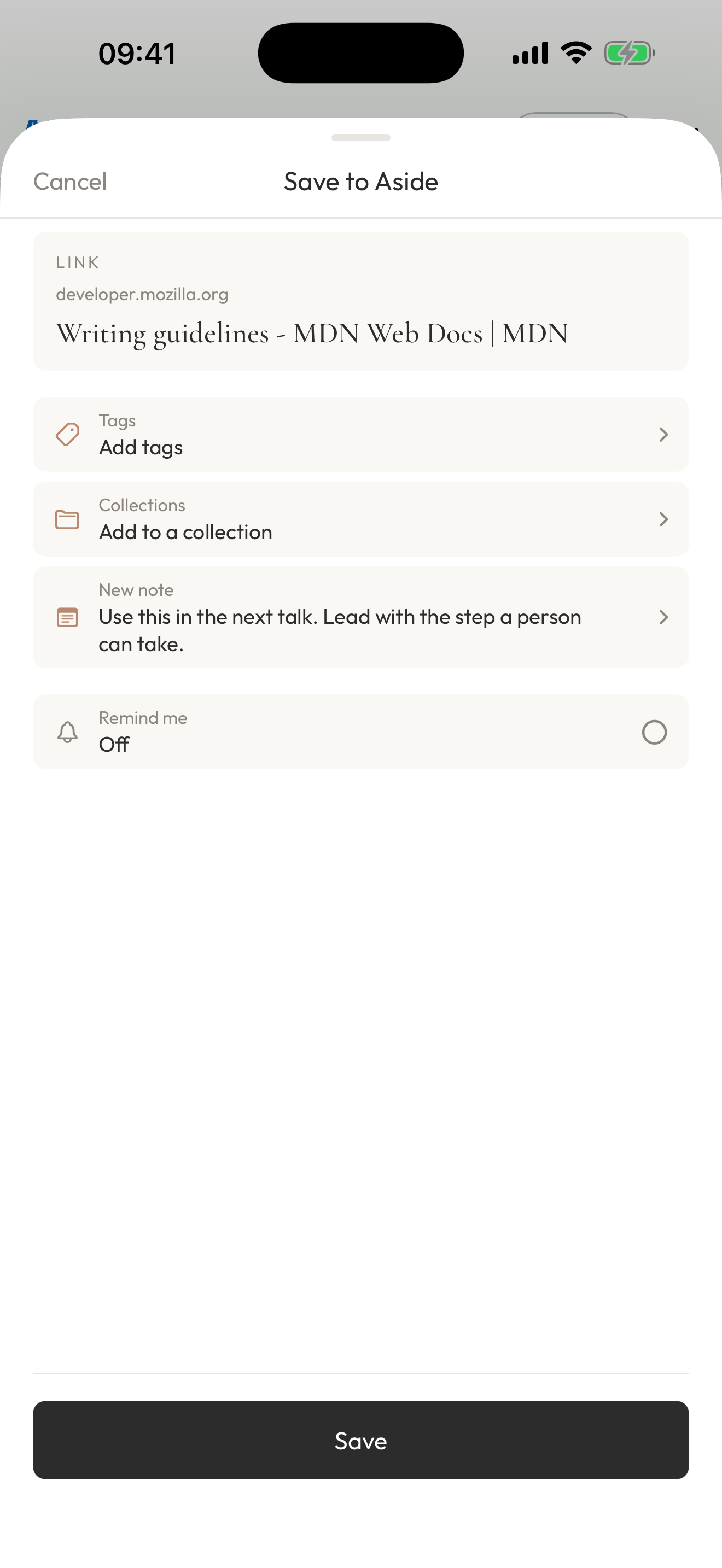
Share an article from Safari to Aside, add your thought and save. Back on Home, your words help you remember why the source mattered.
- 0:05Save the article
Open Aside from the iOS Share Sheet.
- 0:11Add a thought of your own
Keep why it matters, or what you want to try.
- 0:19Pick up the thought later
Find your Note alongside the saved source.
Play the film, or choose a chapter above.
Make it your own
A sentence can be enough.
Add a note when you have something to say. Saving on its own is fine too.
- 01
Find something useful
Choose Aside in another app’s iOS Share Sheet.
- 02
Leave your own thought
Try “Use this in my next talk.” Adding a Note is optional.
- 03
Come back with context
Read your words and revisit the saved content when you need it.
A few things to know
Before you begin.
Is a Note required every time?
No. Save without one, and add your thoughts later if you like.
Is this an automatic summary?
No. These are words you write yourself.
Can I start with my own content instead?
Yes. Tap + on Home to begin a Quick Capture record directly.